Working with JSON in Java Applications
Overview
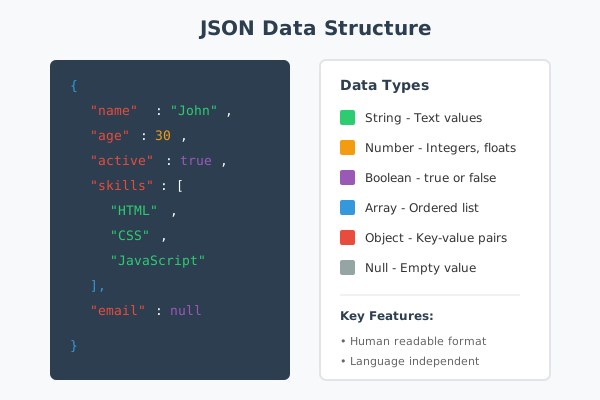
JSON, which stands for JavaScript Object Notation, is a lightweight data interchange format. Despite its name suggesting a connection to JavaScript, JSON is language-independent and can be used with virtually any programming language, including Java. It has become the standard format for transmitting data between Java services and web or mobile clients.
JSON represents data as text that is both human-readable and easy for machines to parse. Its simplicity and universality have made it the preferred choice for APIs, configuration files, and data storage in many modern Java applications as well.
This documentation explains the JSON format in detail, covering its structure, data types, and practical considerations for working with JSON in your applications. Understanding JSON thoroughly will help you design better APIs, debug data issues more effectively, and handle data exchange with confidence.
When to Use It
JSON is appropriate in many data exchange scenarios:
- API responses: Most web APIs return data in JSON format. When building or consuming APIs, JSON is typically the expected format for request and response bodies.
- Configuration files: Many applications use JSON for configuration because it supports complex structures while remaining readable and editable by humans.
- Data storage: Document databases often store data in JSON or JSON-like formats. Even relational databases increasingly support JSON columns for flexible data.
- Front-end and back-end communication: Web applications commonly exchange data between client and server as JSON, particularly in single-page applications.
- Inter-service communication: Microservices architectures often use JSON for messages passed between services.
While JSON is versatile, it may not be optimal for every situation. Binary formats are more efficient for large datasets or when bandwidth is critical. XML may be preferred when document validation and namespaces are required. Consider your specific needs when choosing a data format.
How It Works
JSON represents data using a simple text-based syntax. Data is organized into two structural types: objects and arrays.
Objects
An object is an unordered collection of key-value pairs enclosed in curly braces. Each key is a string, followed by a colon, followed by a value. Multiple pairs are separated by commas:
{
    "name": "John Smith",
    "age": 30,
    "active": true
}
Keys must be strings enclosed in double quotes. Values can be any valid JSON data type. The order of keys in an object is not guaranteed to be preserved, so you should not rely on key ordering.
Arrays
An array is an ordered list of values enclosed in square brackets. Values are separated by commas:
["apple", "banana", "cherry"]
Arrays maintain their order, and you can access elements by their position (index). Arrays can contain any mix of data types, including other arrays and objects:
[1, "two", true, null, {"nested": "object"}]
Data Types
JSON supports six data types:
String: A sequence of characters enclosed in double quotes. Special characters must be escaped with a backslash. For example, quotes become backslash-quote, and newlines become backslash-n.
Number: A numeric value, which can be an integer or floating-point. JSON does not distinguish between integer and decimal types. Scientific notation is supported.
Boolean: Either true or false, written without quotes. These represent logical values.
Null: Represents an empty or non-existent value, written as null without quotes.
Object: A collection of key-value pairs as described above. Objects can be nested within other objects or arrays.
Array: An ordered list of values as described above. Arrays can contain any data type, including other arrays.
Nesting Structures
Objects and arrays can be nested to represent complex data structures:
{
    "user": {
        "name": "Jane Doe",
        "contacts": {
            "email": "[email protected]",
            "phone": "555-0100"
        }
    },
    "orders": [
        {"id": 1, "amount": 99.99},
        {"id": 2, "amount": 149.50}
    ]
}
There is no technical limit to nesting depth, but deeply nested structures become harder to work with and may indicate a need to reconsider your data model.
Parameters or Options
When working with JSON, you will encounter various options for parsing and generating JSON data.
Parsing Options
- Strict vs. lenient parsing: Strict parsers reject any deviation from the JSON specification. Lenient parsers may accept trailing commas, comments, or unquoted keys that technically violate the spec.
- Date handling: JSON has no native date type. Parsers may offer options for automatically converting date strings to date objects.
- Number precision: Very large numbers may lose precision when parsed. Some parsers offer options for handling big integers as strings.
Generation Options
- Pretty printing: Output can be compact (minimal whitespace) or formatted with indentation for readability.
- Sorting keys: Some serializers can alphabetically sort object keys for consistent output.
- Escaping: Options for how to handle Unicode characters and special characters in strings.
- Null handling: Whether to include or omit keys with null values.
Example Usage
Here are practical examples of working with JSON in different contexts.
API Request Body
When sending data to an API, the request body is typically formatted as JSON:
{
    "username": "newuser",
    "email": "[email protected]",
    "preferences": {
        "newsletter": true,
        "theme": "dark"
    }
}
The Content-Type header should be set to application/json to indicate the format of the request body.
Configuration File
A typical configuration file in JSON format:
{
    "server": {
        "host": "localhost",
        "port": 3000
    },
    "database": {
        "connection": "mongodb://localhost:27017",
        "name": "myapp"
    },
    "features": {
        "caching": true,
        "logging": "verbose"
    }
}
Configuration files benefit from JSON's ability to represent nested structures and different data types.
Parsing and Generating
In JavaScript, parsing JSON from a string is straightforward:
const data = JSON.parse('{"name": "Example"}');
Converting an object back to a JSON string:
const jsonString = JSON.stringify(data);
For formatted output with indentation:
const prettyJson = JSON.stringify(data, null, 2);
The second argument can be a replacer function or array to filter properties. The third argument specifies the indentation level.
Common Pitfalls
Working with JSON can lead to subtle bugs if you are not careful about certain aspects of the format.
Trailing commas: Standard JSON does not allow trailing commas after the last element in an object or array. While some parsers tolerate this, it will cause errors with strict parsers.
Single quotes: JSON requires double quotes for strings and keys. Single quotes are not valid JSON and will cause parsing errors.
Comments: JSON does not support comments. If you need to add documentation to JSON files, consider using a format that supports comments or storing documentation separately.
Undefined values: JSON does not have an undefined type. When serializing objects, properties with undefined values are typically omitted entirely rather than included as null.
Circular references: If an object references itself (directly or through a chain of references), JSON serialization will fail. You need to handle circular structures specially before converting to JSON.
Date serialization: Since JSON has no date type, dates are typically converted to ISO 8601 strings. When parsing, these strings are not automatically converted back to date objects unless your parser or code handles this explicitly.
Number limits: Very large integers may lose precision due to how numbers are represented. If exact precision is required for large numbers, consider representing them as strings.
Best Practices
Follow these guidelines for effective JSON usage:
Use consistent naming conventions. Choose a style for property names (camelCase, snake_case, etc.) and apply it consistently throughout your JSON structures. This makes data easier to work with and reduces confusion.
Validate JSON before processing. When receiving JSON from external sources, validate that it matches your expected schema. This catches errors early and prevents security issues from malformed data.
Keep structures flat when possible. Deep nesting makes JSON harder to navigate and process. If you find yourself nesting many levels deep, consider whether the structure could be simplified.
Use meaningful property names. Property names should clearly describe what they contain. Avoid abbreviations that might be unclear to others working with your data.
Document your JSON schemas. When defining APIs or data formats, document what properties are expected, their types, and whether they are required. Tools like JSON Schema can formalize this documentation.
Handle errors gracefully. JSON parsing can fail for various reasons. Always wrap parsing operations in error handling and provide useful error messages when problems occur.
Be mindful of size. JSON is verbose compared to binary formats. For large datasets or high-frequency communication, consider whether compression or alternative formats might be more appropriate.
Conclusion
JSON is the lingua franca of modern data exchange. Its simple syntax, language independence, and human readability have made it the default choice for APIs, configuration, and data storage across the software industry.
Understanding JSON's structure, data types, and quirks enables you to work effectively with this format in any programming environment. Whether you are building APIs, consuming external services, or managing configuration files, a solid grasp of JSON fundamentals will serve you well.
As you work with JSON, remember to validate input, handle edge cases like dates and large numbers appropriately, and follow consistent conventions in your data structures. These practices will help you avoid common problems and build more robust applications.