Understanding the JVM Memory Model
Overview
The Java Virtual Machine (JVM) manages memory for your application so that you do not have to allocate and free every object manually. Understanding how the JVM organizes memory helps you write more efficient code, interpret profiling data, and diagnose memory-related issues such as leaks or excessive garbage collection pauses.
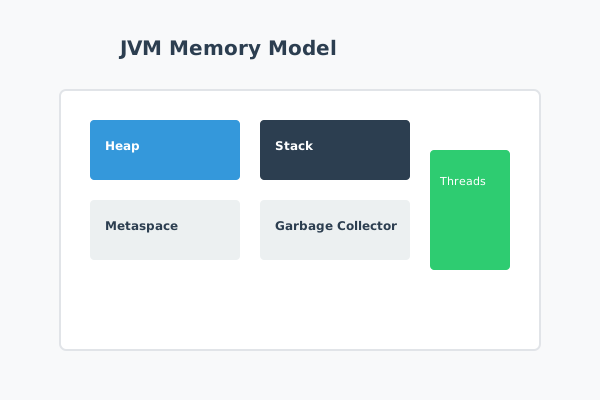
The JVM divides its memory into several logical regions, including the heap, stacks, metaspace, and internal areas used by the garbage collector and threads. Each region serves a different purpose and has its own lifecycle characteristics.
When to Use It
Knowledge of the JVM memory model is particularly important when you:
- Investigate OutOfMemoryError or performance problems related to garbage collection
- Tune JVM options for production workloads
- Design long-running services that must maintain stable memory usage
- Interpret heap dumps, thread dumps, or profiler output
For small experiments, you may not need to think deeply about memory. As applications grow and handle more data or traffic, memory behavior becomes a key part of system reliability.
How It Works
At a high level, the JVM splits memory into areas associated with threads and areas shared across the whole process.
The heap is the main region where objects created with new live. It is shared by all threads, and the garbage collector manages it automatically. The heap is typically divided into generations (young and old) to optimize collection.
The stack is a per-thread region that holds method frames, local variables, and partial results. Each time a method is called, a new frame is pushed onto the stack; when the method returns, the frame is popped. Stack memory is fast but limited; deep recursion can cause a StackOverflowError.
Metaspace stores class metadata, such as method definitions and constant pools. It replaced the older PermGen in modern JVMs. Metaspace grows as more classes are loaded and can also cause memory errors if misconfigured or misused.
Additional regions are used by the garbage collector, JIT compiler, and other internal components, but the heap, stacks, and metaspace are the most relevant to everyday development.
Parameters or Options
The JVM exposes many options for configuring memory behavior. Common settings include:
- -Xms and -Xmx: Set the initial and maximum heap size. For example,
-Xms512m -Xmx2greserves between 512 MB and 2 GB for the heap. - -XX:MaxMetaspaceSize: Limits the size of the metaspace region.
- -Xss: Controls the size of each thread’s stack, influencing how deeply methods can recurse.
- -XX:+UseG1GC and related flags: Select and tune the garbage collector implementation.
Choosing appropriate values requires balancing memory availability, pause times, and throughput for your specific workload.
Example Usage
Consider a service that experiences occasional pauses under heavy load. By enabling garbage collection logging and examining the output, you notice frequent full GC cycles reclaiming large portions of the old generation.
You can experiment with different heap sizes and garbage collectors. For example, launching the application with:
java -Xms1g -Xmx1g -XX:+UseG1GC -jar app.jar
allocates a fixed 1 GB heap and uses the G1 collector, which is designed to reduce pause times by collecting regions incrementally. Armed with an understanding of the heap and GC behavior, you can interpret the results and refine your settings.
Common Pitfalls
One common pitfall is assuming that increasing the heap size always improves performance. In reality, an oversized heap can lead to longer garbage collection pauses, while an undersized heap causes frequent collections and possible OutOfMemoryError exceptions.
Another issue arises when applications load many classes dynamically, such as in plugin architectures. If metaspace is not sized appropriately, you may see OutOfMemoryError: Metaspace even though the heap appears healthy.
Developers sometimes misinterpret stack overflows as heap problems. A StackOverflowError usually indicates deep or infinite recursion rather than a lack of heap space. Adjusting -Xss can increase stack depth, but the underlying code pattern often needs to be reconsidered.
Best Practices
To work effectively with the JVM memory model:
Monitor memory usage in production. Use tools such as JMX, application performance monitoring, or GC logs to observe heap and metaspace behavior over time.
Avoid unnecessary object creation. Reuse immutable objects where appropriate and be mindful of temporary allocations in tight loops.
Use profiling tools. Heap profilers and leak detection tools help identify long-lived objects that should be released or data structures that grow without bounds.
Set reasonable defaults, then measure. Start with balanced memory settings, deploy to a representative environment, and adjust based on observed behavior rather than guesswork.
Conclusion
The JVM memory model provides a powerful, flexible environment for running Java applications, but it is not a black box. Understanding how the heap, stacks, metaspace, and garbage collector interact enables you to write code that cooperates with the runtime rather than fighting against it.
By combining this knowledge with monitoring and profiling, you can tune your applications for stability and performance, even under demanding workloads.