How to Structure a Simple Java Project
Introduction
A clear project structure makes Java code easier to understand, navigate, and build. Even for small applications, following common conventions helps other developers quickly find classes, tests, and configuration files.
This tutorial explains how to organize a simple Java project using a layout that works well with common build tools and IDEs. You will learn where to put source files, how to name packages, and how build descriptors such as pom.xml or build.gradle fit into the picture.
Who This Guide Is For
This guide targets developers who are starting new Java projects without heavy frameworks. It is especially useful if you:
- Are building command-line utilities or small services
- Want your project to be compatible with Maven or Gradle from the beginning
- Need a reference structure to share with teammates
Prerequisites
To follow along, you should have:
- A JDK installed and configured
- Basic knowledge of compiling and running Java code
- A terminal and text editor or IDE
Step-by-Step Instructions
Step 1: Create the Project Root
Start by creating a directory for your project, for example my-app. This folder will contain all source code, tests, and build files. Inside my-app, create a src directory to hold your Java sources.
Step 2: Add Main and Test Source Folders
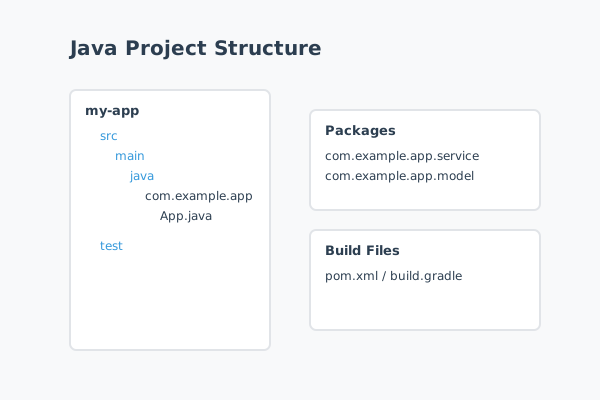
Within src, create two subfolders: main and test. Under each, create a java directory. The resulting layout looks like this:
my-app/
  src/
    main/
      java/
    test/
      java/
This structure matches the conventions used by Maven and Gradle, which means they automatically know where to find production and test code.
Step 3: Define a Package Structure
Inside src/main/java, create a package directory tree that matches your chosen package name, such as com/example/app. Avoid using very short or generic package names; instead, use your domain or organization to keep names unique.
Create a class in this package called App with a main method so you can verify that the structure works.
Step 4: Add Build Files
Even if you start with manual compilation, adding a build file early makes it easier to scale the project. For Maven, create a pom.xml file in the project root. For Gradle, create a build.gradle or build.gradle.kts file.
At minimum, the build file should declare the group ID, artifact ID, version, and source compatibility. This allows IDEs to import the project and manage dependencies later without reworking the structure.
Step 5: Mirror Packages in Tests
Under src/test/java, create matching package directories for your tests, such as com/example/app. Place your test classes here, following a naming pattern like AppTest. Mirroring the package structure keeps tests aligned with the code they verify.
Common Mistakes and How to Avoid Them
A frequent mistake is placing Java source files directly in the project root or in arbitrary folders. While this may work for very small scripts, it quickly becomes unmanageable as the project grows and makes it harder for tools to infer structure.
Another issue is mixing test code with production code in the same folder. Separating them into main and test trees helps maintain clear boundaries and prevents test utilities from accidentally shipping with production artifacts.
Finally, inconsistent package names can cause confusion. Changing package names after the project grows requires updating many files. Decide on a clear naming convention early and stick to it.
Practical Example or Use Case
Imagine you are creating a small REST API service. Following this structure, you can create packages such as com.example.app.controller, com.example.app.service, and com.example.app.model. Controllers handle HTTP requests, services contain business logic, and models represent data.
When another developer joins the project, they can immediately understand where to place new classes. Build tools can also automatically run tests, package the application, and generate artifacts because the structure matches their expectations.
Summary
A simple, conventional project structure saves time and reduces friction as your Java codebase evolves. By organizing code into main and test trees, using consistent package names, and adding build files early, you create a foundation that scales from small experiments to production applications.
Adopting these practices from the beginning helps your projects remain maintainable and welcoming to new contributors.